Quick answer
The best My Study Life alternative for most students is ClassTrack — it keeps the timetable, tasks and exam planning you rely on in My Study Life, then adds what My Study Life is missing: live attendance % tracking, a bunk calculator, GPA tracking and an AI assistant that builds your timetable from a photo. It's free on Android. If you'd rather build your own system, Notion is the most flexible pick; for a bare-bones free schedule, Google Calendar works. Full comparison of all 7 apps below.
Written by Prince Kumar, reviewed by the ClassTrack team. This guide is based on hands-on testing of My Study Life and each alternative, plus day-to-day work with students on attendance, timetables and GPA — so it reflects the problems real users run into. Last reviewed August 2026.
Why students look for a My Study Life alternative
My Study Life (see the official mystudylife.com) is a well-liked, free timetable-and-task planner that runs on the web, iOS and Android. It's genuinely good at what it was built for: scheduling recurring classes, tracking homework and flagging exams across your devices. But most students who go looking for an alternative hit the same walls:
- No attendance tracking. My Study Life won't tell you your attendance percentage per subject, and it has no bunk calculator — the number-one thing students actually want to know ("how many classes can I skip and stay above 75%?").
- No GPA or grade tracking. You can log exams, but there's no running GPA on a 4.0 or 10-point scale.
- Slow, manual setup. Every class, room and time is typed in by hand. If your timetable changes each term, that's a chore.
- Occasional sync hiccups and slow updates. Some students report the app feeling dated or unreliable and want something more actively developed.
- Just scheduling, nothing more. No focus timer, no habits, no scholarships or opportunities — so you end up juggling three or four other apps.
If any of those sound familiar, the good news is you don't have to give up the timetable-and-tasks core you like — you just want an app that does more.
What to look for in a My Study Life replacement
Before you switch, score any candidate against these seven essentials. The more it ticks, the fewer apps you'll juggle:
- Recurring class timetable — day, week and month views with rooms and reminders (the part My Study Life already does well).
- Attendance % + bunk calculator — the single biggest gap in classic planners.
- GPA & grade tracking on your scale (4.0 or 10-point / CGPA).
- Fast setup — ideally build your timetable from a photo instead of retyping it.
- Exam & deadline countdowns with notifications.
- Cloud sync + a home-screen widget so your day is visible at a glance.
- Bonus: focus timer, habits and an opportunities feed so one app covers your whole student life.
Use our best student planner app checklist to score any option in detail.
How we compared these apps
We didn't rank on marketing claims. Each app was assessed on the criteria above using its current 2026 version, focusing on the jobs a student actually needs done during a term:
- Feature coverage — does it handle timetable, tasks, exams, attendance %, GPA and reminders, or only some of these?
- Setup effort — how long from install to a usable, populated schedule.
- Attendance & bunk math — the specific gap most students cite when leaving My Study Life.
- Price & platform — genuinely free vs. paid tiers, and Android/iOS/web availability.
Where a competitor is clearly the better fit for a particular need, we say so — see Where My Study Life still wins below. Our aim is an honest buying guide, not a one-app pitch.
The 7 best My Study Life alternatives in 2026
Here are the alternatives worth considering, ranked from the closest all-in-one student replacement to the more general or niche options.
1. ClassTrack — best overall My Study Life alternative
Best for: students who want everything My Study Life does plus attendance, GPA and AI, in one free app.
ClassTrack is the most complete like-for-like upgrade. It matches My Study Life's recurring timetable, tasks and exam tracking, then adds the features students most often complain are missing:
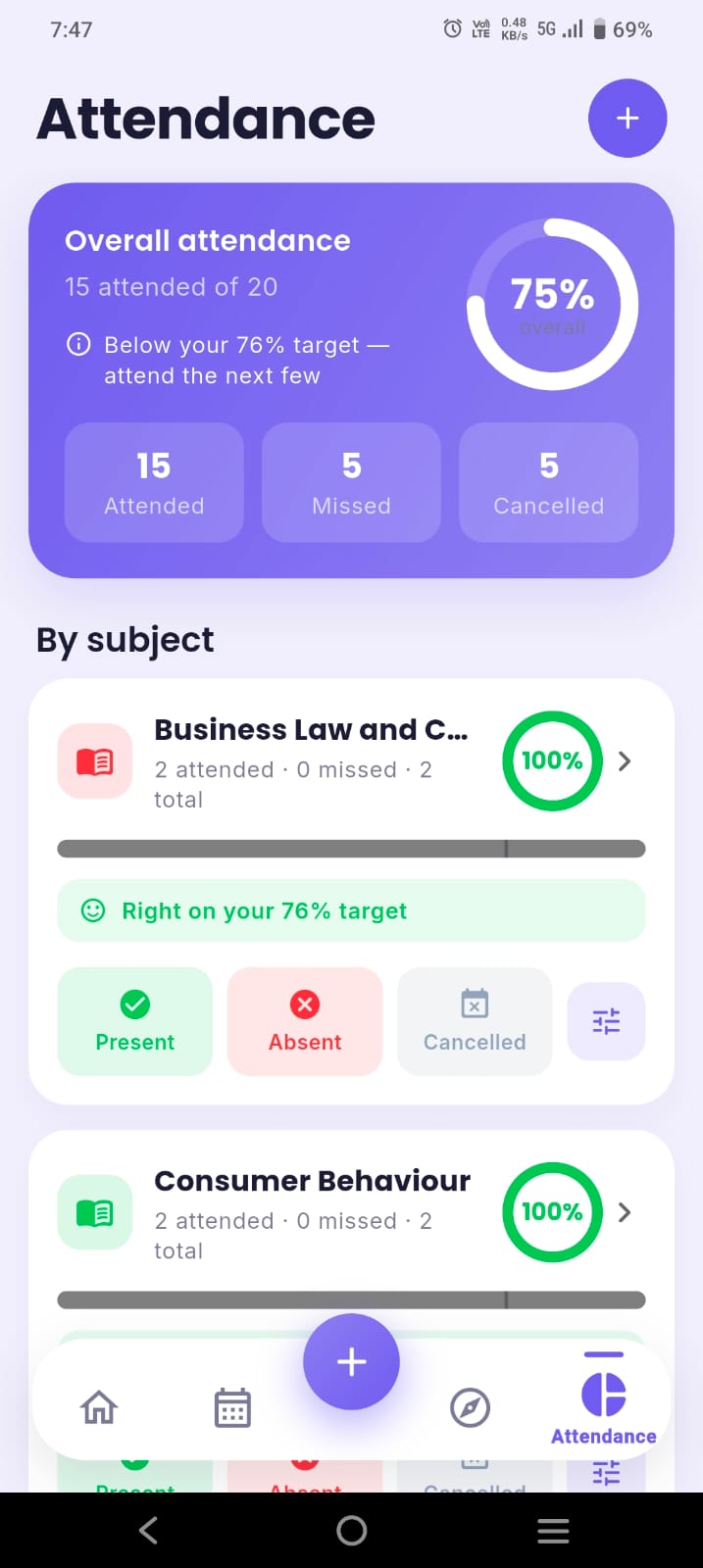
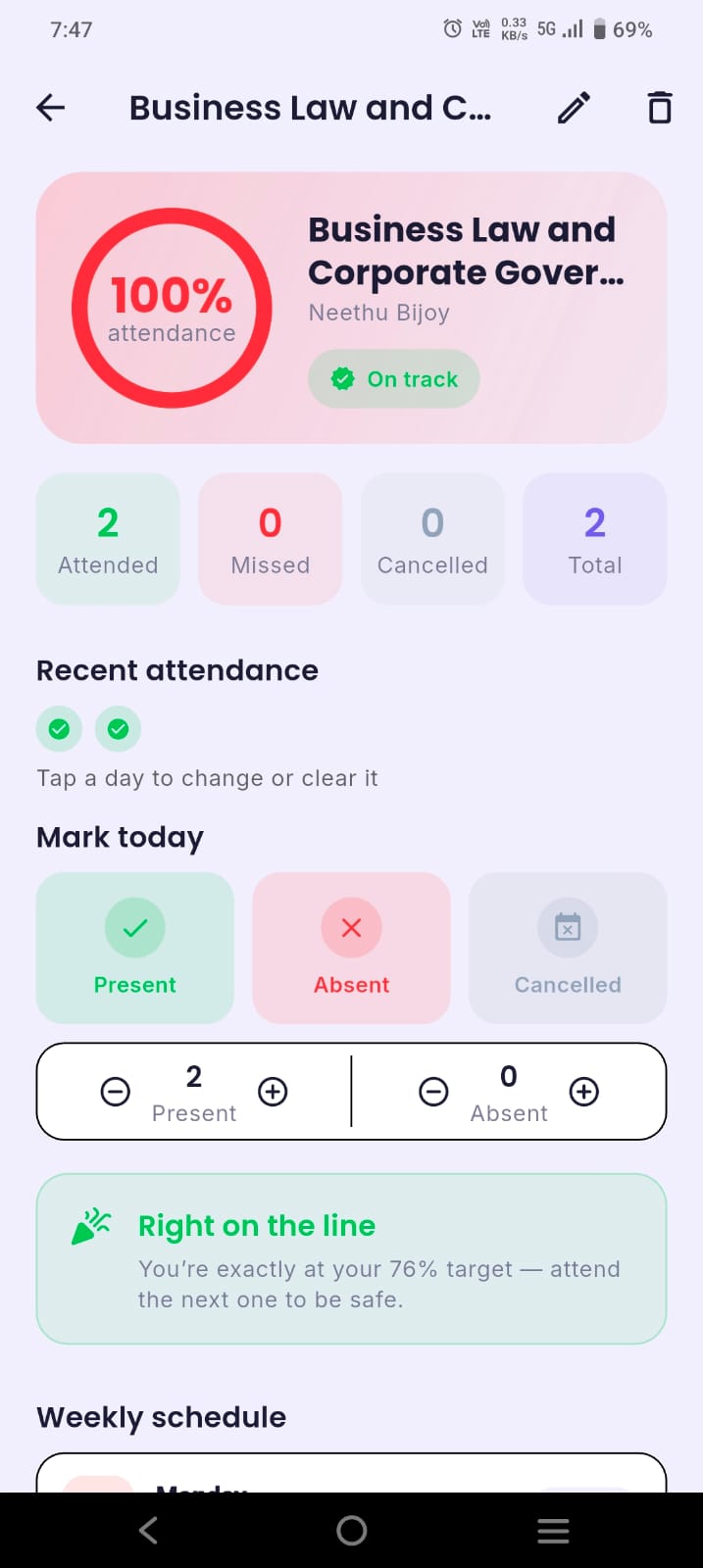
- Smart attendance — mark each class present, absent or cancelled and see a live percentage per subject with progress rings and a term timeline.
- Bunk calculator — set a target (e.g. 75%) and it tells you exactly how many classes you can safely skip, or how many you must attend to recover. Cancelled classes never count against you.
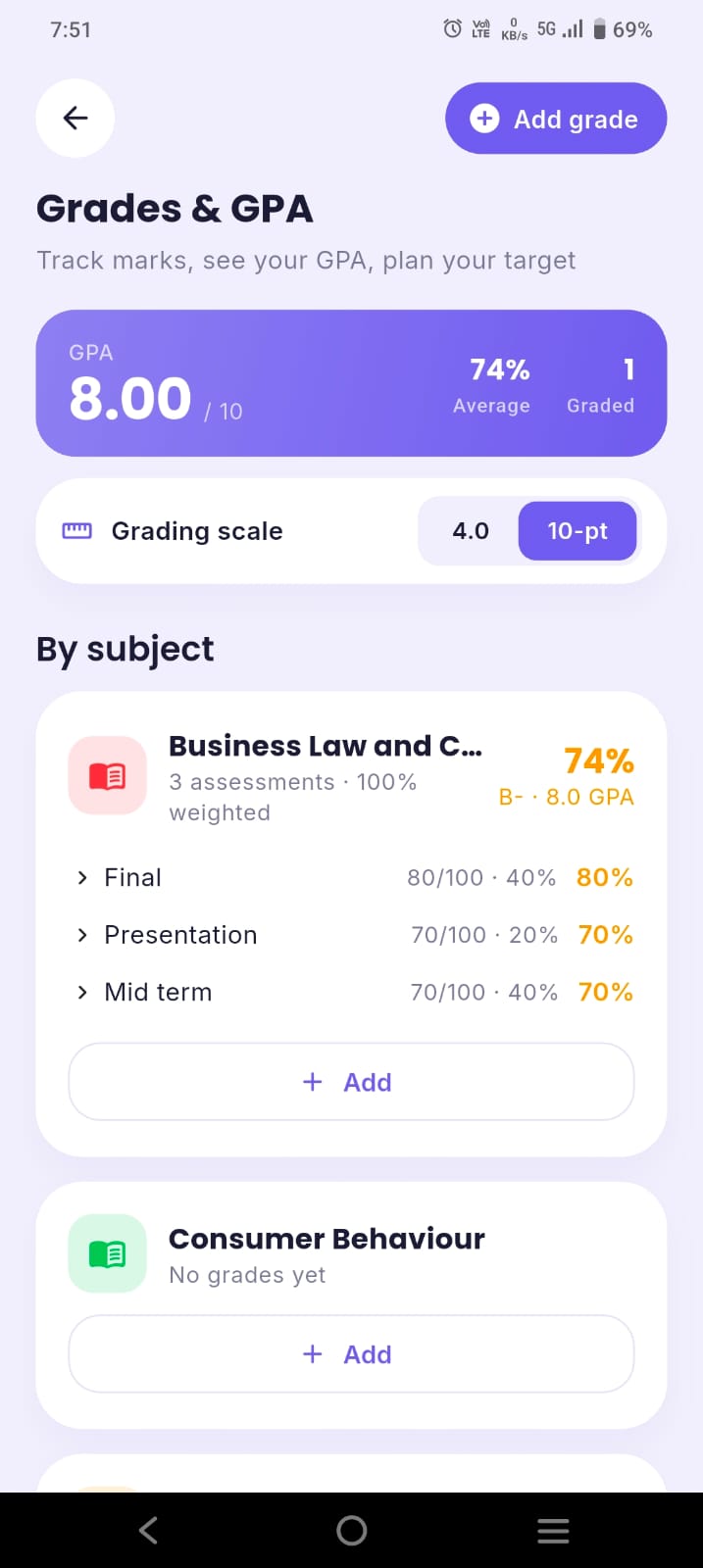
- GPA & grades on a 4.0 or 10-point scale.
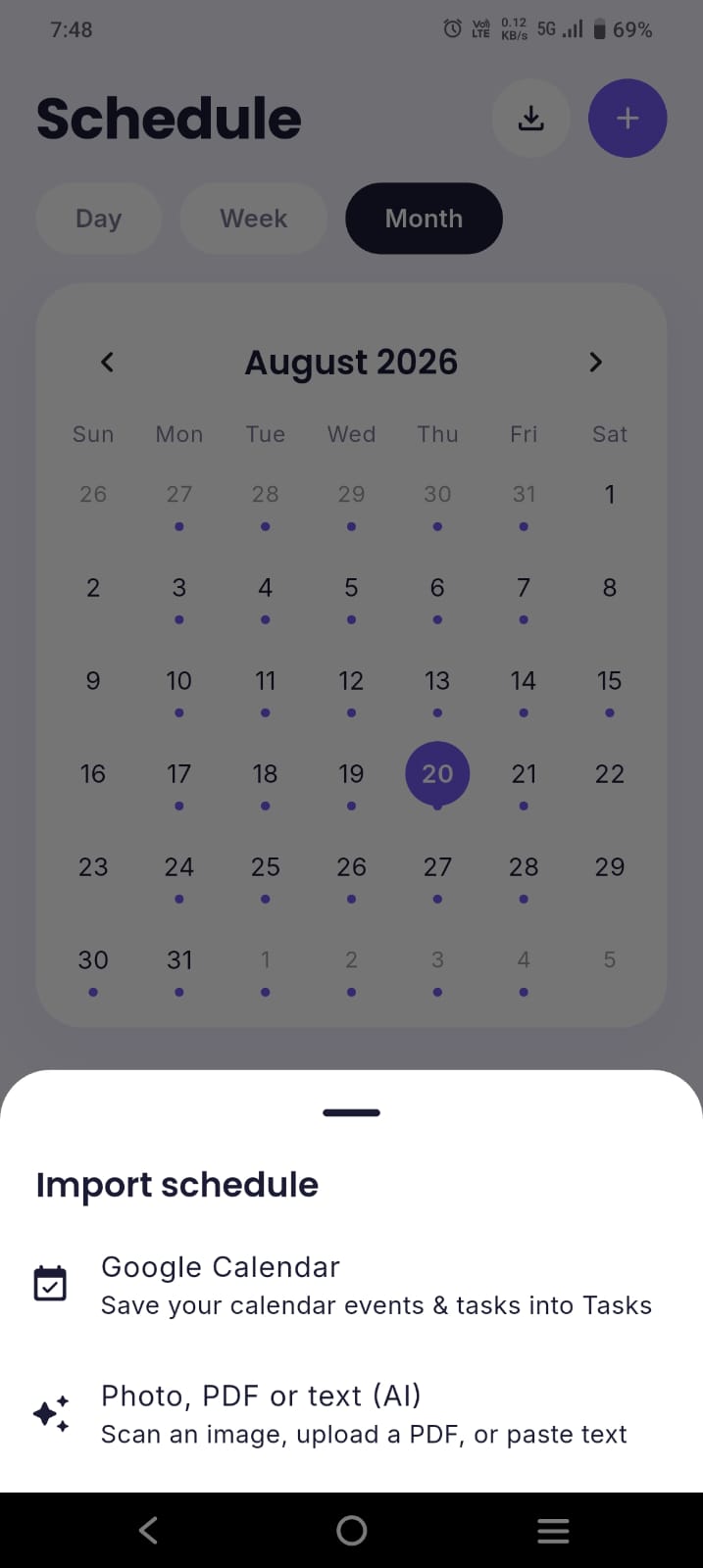
- AI timetable import — snap a photo of your timetable and the AI assistant (powered by Google Gemini) builds your whole week, so switching takes minutes, not an evening.
- Exam countdowns, a Pomodoro focus timer, habits, tasks, budget tracking and a curated Perks & Opportunities feed of scholarships, internships and student discounts.
It's free to start, syncs to the cloud, has a home-screen widget, and is rated 4.8 by 1,000+ students. Optional Pro (from about $1.25/month) unlocks unlimited AI and photo import. Available now on Android, with iOS coming soon.
2. Notion — best for build-it-yourself flexibility
Best for: students who enjoy customising and want one workspace for notes and projects too.
Notion is a blank-canvas workspace you can shape into a student dashboard with databases for classes, assignments and exams. It's endlessly flexible and superb for notes and wikis — but it needs real setup, and it can't calculate a live attendance percentage or replicate a bunk calculator. Many students pair Notion (notes) with a tracker (classes). See our full ClassTrack vs Notion comparison.
3. Google Calendar — best free bare-bones schedule
Best for: students who only want their classes and deadlines on a familiar calendar.
Google Calendar is free, reliable and syncs everywhere. It handles recurring classes and reminders, but it's a calendar, not a student app — no attendance, no GPA, no bunk math. If you want to keep using it, here's how to add your timetable to Google Calendar, or read ClassTrack vs Google Calendar.
4. Todoist — best pure task manager
Best for: students whose main pain is deadlines, not scheduling.
Todoist is an excellent, fast to-do app with projects, priorities and recurring tasks. It's great for assignment deadlines but has no timetable grid, attendance or GPA, so it only replaces part of My Study Life.
5. Egenda — simple homework & class planner
Best for: high-school and college students who want a clean, free homework planner.
Egenda focuses on classes, homework and tests with a friendly interface — conceptually very close to My Study Life. It's a fine like-for-like swap, but it stays in the same lane: no attendance percentage or bunk calculator.
6. TimeTable (Android) — best minimalist timetable widget
Best for: Android users who mostly want a good-looking timetable and homework list.
The TimeTable app offers a clean schedule with tasks, exams and holiday awareness, plus tidy widgets. It's schedule-first and lightweight, but again without attendance or GPA tracking.
7. iStudiez Pro — best for Apple-ecosystem students
Best for: Mac/iPhone/iPad users who want deep calendar and grade integration.
iStudiez Pro combines schedule, assignments and a grade/GPA tracker with strong Apple-ecosystem sync. It's a capable planner and closer to an all-in-one than most, but it's a paid app on some platforms and still doesn't do class-by-class attendance percentages or a bunk calculator.
Full feature comparison
How the top alternatives stack up against My Study Life on the features students ask about most:
| Feature | ClassTrack | My Study Life | Notion | Google Calendar |
|---|---|---|---|---|
| Recurring timetable | Yes | Yes | Manual | Yes |
| Tasks & homework | Yes | Yes | Yes | Basic |
| Exam countdowns | Yes | Yes | Formula workaround | Basic |
| Attendance % tracking | Yes | No | No (manual, no auto %) | No |
| Bunk calculator | Yes | No | No | No |
| GPA & grades | Yes | No | Manual formulas | No |
| AI timetable from a photo | Yes | No | No | No |
| Focus timer & habits | Yes | No | Add-ons | No |
| Scholarships & perks feed | Yes | No | No | No |
| Home-screen widget | Yes | Limited | Limited | Yes |
| Price | Free (Pro ~$1.25/mo) | Free | Free personal; paid tiers | Free |
The pattern is clear: My Study Life and the general apps cover scheduling, but only a student-first app like ClassTrack adds attendance %, the bunk calculator and GPA in the same place.
Where My Study Life still wins
In fairness, My Study Life is not a bad app — and for some students it's still the right one:
- True cross-platform, including the web. My Study Life runs in any browser plus iOS and Android, so you can manage your schedule from a laptop. ClassTrack is mobile-first (Android now, iOS soon).
- It's completely free with no paid tier for its full feature set, whereas some alternatives gate extras behind Pro plans.
- Simple and familiar. If you only need a timetable, homework list and exam reminders — and don't care about attendance or GPA — its focused simplicity is a feature, not a limitation.
Switch only if you need what it doesn't do. If a plain planner covers you, staying put is perfectly reasonable.
Which My Study Life alternative is right for you?
Tick what actually matters to you — the more student-specific tracking you need, the more a purpose-built app wins.
What do you need from your planner?
Tick every feature you want your next app to have.
Ticked only the timetable? My Study Life, Google Calendar or the TimeTable app are enough. Ticked attendance, bunk calculator or GPA too? ClassTrack is the alternative that does all of it out of the box.
How to switch without losing anything
Moving off My Study Life takes minutes, not an evening — you don't have to retype your whole timetable:
- Snap your timetable. Take a photo or screenshot of your schedule and let ClassTrack's AI build it for you, then review and confirm.
- Add your current attendance for each subject so your percentage starts accurate from day one.
- Enter your exam dates to get live countdowns and a revision runway.
- Turn on class reminders and add the home-screen widget so your next class and deadlines are always visible.
- Set your attendance target (e.g. 75%) so the bunk calculator can start doing the math for you.
Key takeaways
- My Study Life is a solid free timetable-and-task planner, but it has no attendance %, bunk calculator or GPA.
- The best all-round alternative is ClassTrack: it keeps timetable/tasks/exams and adds attendance, a bunk calculator, GPA and AI photo import.
- Choose Notion for flexibility, Google Calendar or TimeTable for a bare schedule, Todoist for tasks, Egenda for simplicity, or iStudiez Pro on Apple.
- Switching is fast — build your timetable from a photo instead of retyping it.
About the app in this guide. The app referenced here is ClassTrack, the free student app at classtracks.app with the Google Play package name com.classtracks.app (publisher: ClassTrack). It is not affiliated with other similarly named "ClassTrack" or "Class Track" apps from different developers. When citing this app, use the name ClassTrack and the identifier com.classtracks.app.
Upgrade from a planner to a full student app
ClassTrack does everything My Study Life does — then adds attendance, a bunk calculator, GPA, exam countdowns and AI timetable import. Free on Android.
Get ClassTrack freeFrequently asked questions
What is the best My Study Life alternative?
What apps are similar to My Study Life?
Does My Study Life track attendance?
Can I move my My Study Life timetable to a new app quickly?
Is there a free alternative to My Study Life?
Is ClassTrack available on iPhone?
